

Introduction
Saving money sounds easy until reality gets in the way. Bills come in, groceries cost more than planned, subscriptions silently renew, and at the end of the month there can be nothing to put toward savings.
And that’s why an automatic savings system can be so powerful. It means no remembering, no deciding, no negotiating with yourself every payday. You create a mechanism that moves money before it’s spent, instead of waiting to save what’s left.
An automatic savings system isn’t just for rich earners. It can work for a student, new employe, family with children, freelancer or someone who is rebuilding after debt. At initially it may be a modest quantity. It’s not about the amount of the first transfer, but the habit.
Here’s your step-by-step guide to setting up an automatic savings system, including how much to automate, which accounts to use, and how to prevent the pitfalls that cause automated saving to fail.
Short answer:
An automatic savings system deposits money from checking to savings on a regular timetable, typically after paycheck. To create one, you’ll choose a goal, open a separate savings account, determine how much to transfer, establish recurring transfers, and check in monthly to ensure the system works with your income and expenses.
- Key Takeaways & Core Automation Rules
- What Is an Automated Savings System?
- Why Behavioral Automation Eliminates Willpower
- Step 1: Pick Your Concrete Savings Targets
- Step 2: Choosing the Best High-Yield Savings Account (HYSA)
- Step 3: Determining What Percentage to Automate
- Step 4: Scheduling Transfers Directly on Payday
- 🧮 Interactive Automated Savings & Wealth Projector
- Step 5: Setting Up Sinking Funds & Goal Buckets
- Step 6: Pay Yourself First vs. Traditional Leftover Savings
- Step 7: Prioritizing Your 3-6 Month emergency fund
- Step 8: Protecting Your Checking Account From Overdrafts
- Common Automation Traps to Avoid
- Sample Automated Savings Blueprint for $4,500/Month
- Frequently Asked Questions About Automatic Savings
Key Takeaways
| Important Point | What It Means |
| Automate post-payday. | Put some of your income aside as soon as you get it, so it is saved before it is spent. |
| Start with little steps | Even a tiny automatic transfer creates stability and cuts down the chances of quitting. |
| Accounts in separate | Temptation is reduced by separating savings from daily expenditure. |
| Match transfers to goal | Not all in one nebulous bucket. Emergency cash. Vacation. Taxes. Down payments. |
| Regularly review | If your income, obligations, debt or goals change, tweak your automation. |
What is an automated savings system?
An automatic savings system is a simple way to make money go into savings without having to manually transfer it each time.
The most popular option is to have a recurring transfer from your checking account to a savings account. Some firms also do split direct deposit, which directs a portion of your paycheck right into savings, before it hits your checking account.
It’s about making saving the status quo. When you need motivation to save, it’s simple to skip. And if you automate it, you make saving a regular part of your financial habit.
The Consumer Financial Protection Bureau says one of the easiest and most consistent methods to boost savings is to make saving automated. That approach works because automation removes the most common source of failure: waiting until the end of the month.
Automation also reduces decision fatigue. No need to ask yourself, “Should I save this week?“The system already has an answer for you.
Why Automatic Savings Is Effective
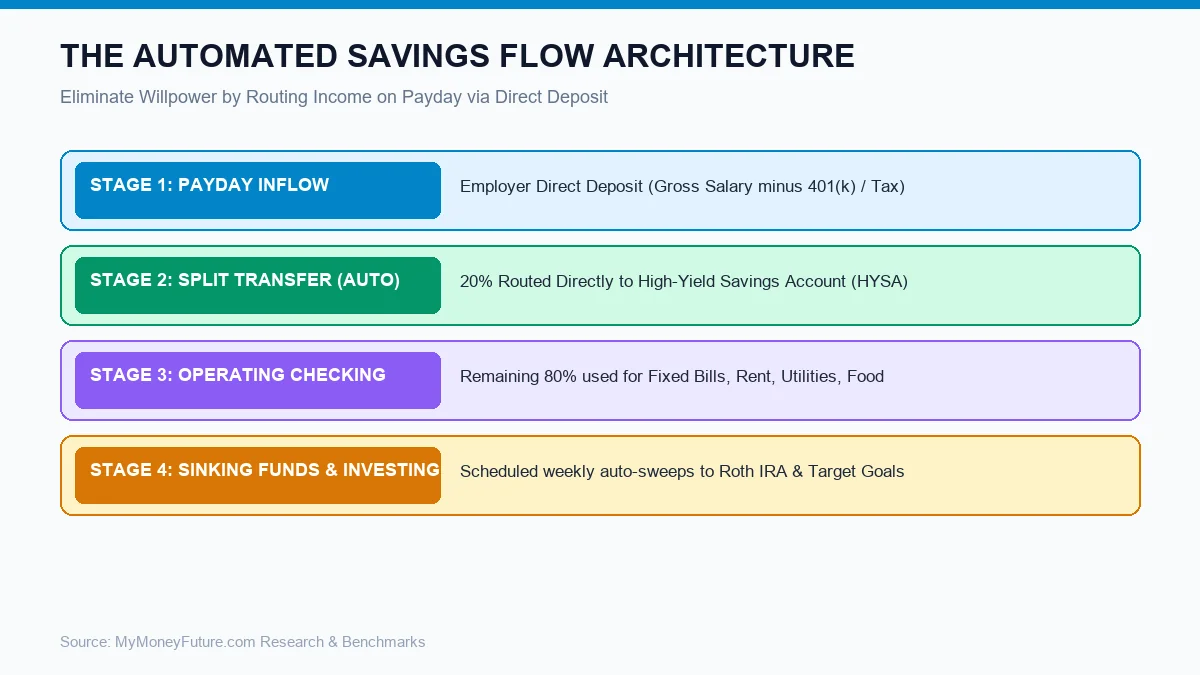
The truth is, most people don’t fail at saving because they’re lazy. They fail because their money has too many jobs to do, at the same time.
Paychecks, bills, food, petrol, entertainment, subscriptions etc all get mixed up in a checking account. Savings might look available, even when they have a future purpose, when everything is in one location.
Automatic saving takes the temptation away from the decision. Money doesn’t get confused with daily spending, it just goes away.
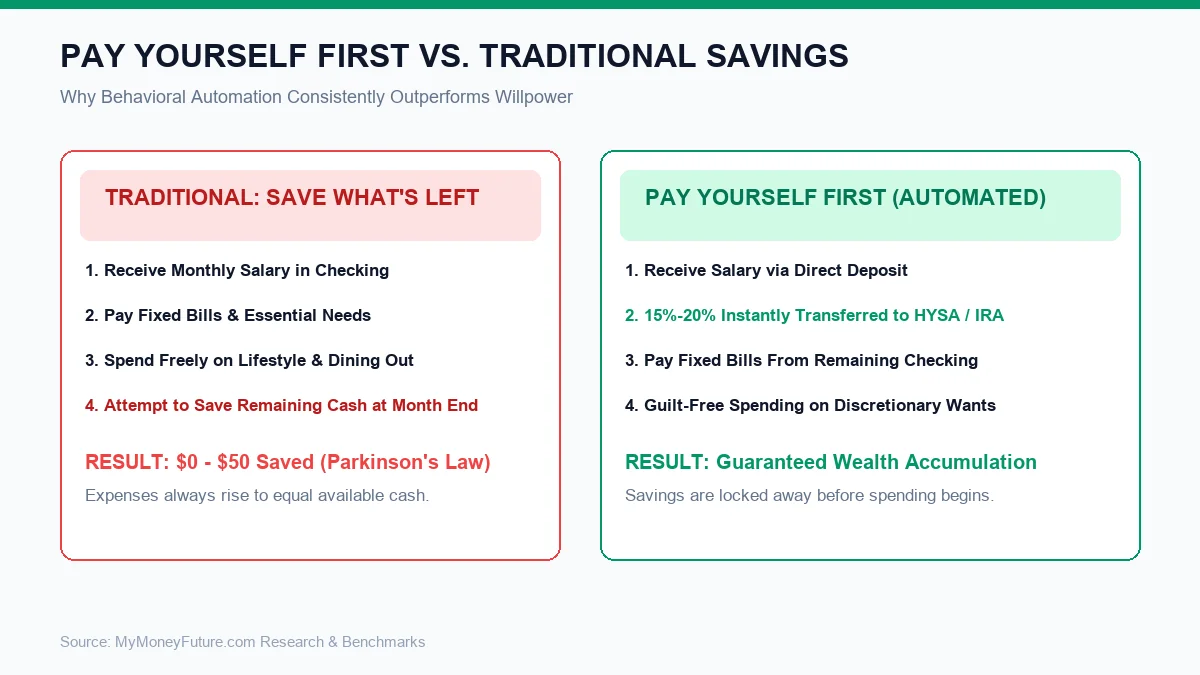
It also fosters the habit of “paying yourself first.” You save first and build spending around the leftover instead of conserving what’s left.
| Manuel Save | Save Automatically |
| its all about your will power | Depends on a scheduled regime |
| Month-end – Often happens during month-end | Usually occurs after paycheck |
| Easy to bypass | More forgettable |
| Savings may be used erroneously | Savings are split sooner |
| Works when life is good | Works even on hectic weeks |
Step 1: Pick Your Savings Target
“Don’t try to automate 10 goals simultaneously. That leads to confusion and makes the system more difficult to manage.
Choose one priority to start with. For most people the initial goal should be a beginning emergency fund. This is money set aside to cover unforeseen expenses such as auto repairs, medical bills, job loss or emergency home repairs.
Then you can add other goals such as a vacation fund, tax fund, car replacement fund, home down payment, holiday fund or investment contribution.
| Purpose | Why it’s important | Starting Amount (Good) |
| Emergency fund kickstarter | Stops little surprises from turning into debt | $500 – $1,000 |
| Emergency fund in full | Protects against larger shocks to income/expenses | 3 to 6 months of savings |
| Annual bills pay for | No worry as yearly bills roll in | Monthly share of annual bill |
| Debt repayment help | It enables you to make extra payments | Amount as per your budget |
| Big purchases fund | Less need for loans or credit cards | Depending on the purpose |
Having a specific goal provides your automatic transfer a purpose. Knowing that it is going into establishing a $1,000 emergency buffer instead of a nebulous account named savings makes it simpler to save $75 out of every paycheck.
Step 2: Choosing the Best Savings Account
You want your automated savings account to be convenient enough to get into, but not so accessible that you raid it for routine expenditure.
Regular savings accounts or high-yield savings accounts can be good for short-term aims. The money is still there , but it is not in your checking account .
Keep your emergency cash in a low-risk investment. Emergency money need safety and access, not huge profits.
For longer term planning, such as retirement or investing, you might want to automate contributions into retirement or investment accounts. But that should follow after you have adequate cash for basic emergencies.
Step 3: Determine what to automate
The best amount is whatever you can continue to do.
A lot of individuals will fail because they pick a number that sounds impressive but they don’t have the cash flow to support it. They automate $500, then two weeks later reverse the transfer because they need the money for rent, groceries or debt payments.
Pick a number that sounds almost laughably simple. You can get it up later.
| Monthly Income (post Tax) | Transfer Conservative Starting | Increased aggressive movement |
| $2,000 | $25 – $75 | $100-$200 |
| $3,500 | $75 – $150 | 200 – 350 |
| $5,000 | $150 and $300. | $400-$750 |
| $7,500 | $300-$500 | $750 – $1,200 |
These numbers are instances, not rules. And if someone has a high rent or debt they may need to start small. Those that live below their means may be able to automate much more.
4. Schedule transfers right after payday
Timing is everything. A transfer scheduled too late in the month may not go thru, because the money has already been spent.
A good rule of thumb is to automate savings the day after payday. This way your paycheck has time to clear, yet the money is flowing before the everyday expenses kick in.
If you get paid every 2 weeks, schedule a transfer every 2 weeks. If you get paid monthly, do it monthly. If you’re self-employed, think about moving a percentage every time you earn some income.
| Type of Income | Proposed Automation Schedule |
| Weekly wages | Weekly after paycheck transfer |
| Bi-weekly pay check | Transfer after each pay check |
| per month Salary | Transfer monthly after deposit |
| Freelance income that is irregular | Transfer percentage when paid |
| Commission revenue | More from good months plus base transfer. |
Automation can work, even if your income is unreliable. Use small, fixed transfers, and in good months, add manual, extra transfers.
Interactive Automated Savings & Wealth Projector
Project your accumulated cash reserve and investment net worth by automating payroll deductions.
Step 5: Assign Your Savings Buckets
One savings account is better than none, but having numerous buckets might make your system clearer.
Many banks allow you to create sub-accounts or nickname accounts. You may establish one account for emergencies, one for annual payments, one for travel, and one for a car fund.
This helps avoid a common problem: assuming you have more money than you actually do. $3,000 in one savings account could seem reachable. But when you break it down, $1,500 for emergencies, $800 for taxes and $700 for insurance, the picture is a little more accurate.
Step 6: Automate Before Spending More
It’s good to build savings before lifestyle expenditure increases during a raise, bonus, tax refund or side income payment.
This is known as preserving the increase. You get a pay raise of $300 a month? You may just automate $150 of it and enjoy the other $150.
This is easier than trimming back afterward. You’re not giving up money you already know how to spend. You are leading fresh money into the normal.
Step 7: Prioritize an emergency fund
Cash protection should generally start automatic savings.
A beginning emergency fund can assist prevent little surprises from turning into credit card debt. An emergency fund can shield you from bigger shocks like job loss or medical bills.
The CFPB defines an emergency fund as a stash of cash for unforeseen costs and says that regular transfers help folks build it up over time. If you’re choosing how much cash to have on hand, their emergency fund guide is useful.
After you’ve built up an emergency fund, your automatic system can grow to include retirement savings, investment, debt payoff, or saving for big expenditures.
Step 8: Guard the System from Overdrafts
Automation is only good provided it doesn’t cause other difficulties.
Before you set up any transfers, make sure you have enough money in your checking account to pay for rent, utilities, loan payments, food and transportation.
If you are frequently operating at 0 balance, start with a very tiny transfer. You can also set up your savings to occur when your significant expenses clear rather than just after paycheck.
A good automatic system should relieve stress, not create overdraft fees.”
Mistakes to Avoid
Too Large To Start
A big move may sound thrilling, but if it does not fit your budget, it can be a flop. Start with a number you can maintain for three months.
Seeking Savings
Money in checking is easy to spend. Move funds into a different account, so they aren’t confused with routine spending.
No Goal Named
A vague savings account is easy to plunder. It’s easier to respect a certain emergency fund, or a car repair fund.
Neglecting annual costs
Without a plan, insurance, presents, school fees, taxes and car maintenance can all catch you out. Automate little sums for these expenses throughout the year.
Never Increasing the Transfer
If your income rises but your savings transfer stays the same indefinitely, you could be missing out on an opportunity to grow your wealth faster.
Sample Automatic Savings Plan
Let’s say someone makes $3,800 a month, and wishes to build up a $2,000 initial emergency fund.
| Movement. | Amount: |
| Paycheck received twice a month | $1,900 for each |
| Auto transfer after every paycheck | $100 |
| Total savings each month * * | $200 |
| Time $2,000 | ~ 10 months |
If this person gets a raise later and raises the transfer to $150 each check, the timing shortens.
The important thing is that the transfer be automatic. The person does not have to recall 20 times to save. The system works for you.
Automatic Savings When Money’s Tight
Money is tight, automation can seem unachievable. But even a tiny move can create trust.
Start with $5, $10 or $25 from each payday. The sum may not suddenly improve your circumstances but it shows savings may become routine.
Then find a little expense to redirect. The next jump can come from canceling a subscription you forgot about, making an extra meal at home, or downgrading a phone plan.
Saving is not merely a matter of income. It’s about developing a system that can be repeated.
Professional Advice
- If your company will allow it, use split direct deposit.
- Don’t mix emergency savings with vacation or shopping money.
- Increase automatic transfers each time you get a raise, bonus or pay down debt.
- Make separate buckets for annual bills so they don’t turn into emergencies.
- Set calendar reminders to check your savings system on a monthly basis.
- Don’t put money into it that you may need in the following few of months.
- If your revenue falls, you can pause or cut transfers momentarily, but restart them as soon as you can.
Frequently Asked Questions About Automatic Savings Systems
1. What is the biggest advantage of setting up an automatic savings system?
It eliminates reliance on willpower and removes behavioral friction. By automatically moving savings the exact day your direct deposit hits, you enforce “Pay Yourself First” before discretionary lifestyle spending occurs.
2. How much of each paycheck should I automatically transfer to savings?
Under the classic 50/30/20 budget framework, 20% of net take-home pay is allocated to savings and debt reduction. If 20% feels tight, begin with 5% or 10% and increase the automated transfer by 1% every quarter.
3. Should I split direct deposit through my employer or use scheduled bank transfers?
Employer direct deposit splitting is the gold standard because the money never touches your checking account, preventing overdraft risks. If employer splitting is unavailable, configure automatic bank transfers 1-2 days after scheduled payday.
4. Where should my automated cash savings be stored?
Always use an FDIC-insured High-Yield Savings Account (HYSA) offering 4.0% to 5.0% APY. Traditional big-bank savings accounts pay a negligible 0.01%, costing you hundreds of dollars in lost interest annually.
5. How do I prevent overdraft fees when automating transfers?
Keep a permanent $250 to $500 buffer in your operating checking account. Always schedule recurring transfers 24 to 48 hours after payroll processing dates to accommodate weekend or bank holiday payment delays.
6. What are sinking funds and how many should I automate?
Sinking funds are designated sub-accounts for planned, irregular expenses (car repairs, holidays, insurance premiums). Most savers thrive with 3 to 4 automated buckets: Emergency Reserve, Car Maintenance, Travel/Gifts, and Long-Term Goals.
7. Should I automate investing at the same time as cash savings?
First establish a 1-month cash buffer in your HYSA. Once that foundation is set, automate recurring contributions into broad-market index funds (e.g. S&P 500) and your Roth IRA to build compound growth concurrently.
Disclaimer: The purpose of this article is to inform and educate the reader about the topic discussed herein; we attempt to provide up-to-date factual material that is accurate; however, we do not guarantee any of this information as complete or correct; you must make your own financial decisions based upon your own situation (e.g., your financial goals) and willingness to take on risk; any actions you take as a consequence of this article’s contents are at YOUR RISK.
Automate Your Entire Financial Life
Systemizing your savings is the master key to financial independence. Explore our step-by-step blueprints to budget effortlessly, crush high-APR debt, and start investing.
Take Control of Your Budget Instantly
Don't just read about money management—calculate your exact monthly breakdown right now using our free financial tools: